 LuckPerms

Hytale
There is an beta version of LuckPerms for Hytale available from our downloads page. This is the same LuckPerms you know and (maybe/hopefully) love from Minecraft, ported across and integrated with Hytale! 🎉
LuckPerms for Hytale is built on top of the same common codebase as the other LuckPerms plugin/mods. We believe that basing the Hytale version of LuckPerms on top of the same established core platform as our existing well-proven Minecraft releases enables us to provide a very stable and performant permissions implementation for Hytale, to a higher quality than "bespoke" plugins could. 🥳
Some of the documentation here on the wiki and elsewhere in the project is lagging behind slightly and still references Minecraft in a few places. However, thankfully the permissions system in Hytale is very similar to the "Bukkit" system that most of the Minecraft ecosystem has adopted, so most if not all of the existing concepts in LuckPerms for Minecraft apply in Hytale too! Yay!
We hope you enjoy using LuckPerms on your Hytale servers!
FAQs
- I've never used LuckPerms before! How do I get started?
- OP doesn't work anymore!
- Compatibility with other mods/plugins
- Finding permissions and troubleshooting
- Chat formatting
- Integrating with the LuckPerms API
- Known caveats/issues
I've never used LuckPerms before! How do I get started?
Hello and welcome! 👋
The short answer is, check out the:
- Installation page to learn how to install LuckPerms, then the
- Getting Started page for how to start using it!
After that, if you've never used a permissions plugin before and want to find out more, we suggest you just start at the top and work your way down! A more to the point command reference can be found in the Command Usage subpages.
OP doesn't work anymore!
When LuckPerms is installed, the built-in Hytale permission system is largely replaced. This is so LuckPerms can intercept and handle permissions checks for players.
This means that:
- The built-in
/opcommand will not work as expected. Use LuckPerms to configure permissions instead. - The built-in
/permcommand will not work as expected. You must use the LuckPerms/lpcommands to configure permissions for players.
If you want to replicate OP-like functionality (full access to all commands, features, etc), you can use the following LuckPerms commands:
/lp user <user> permission set *- give<user>all permissions/lp group <group> permission set *- give any user in<group>all permissions (e.g. you may want to do this for your "admin" or "owner" group)
Compatibility with other mods/plugins
LuckPerms aims to maintain compatibility with other mods checking permissions via CommandSender#hasPermission or PermissionsModule#hasPermission. If you other mods check for permissions this way, everything should work absolutely fine!
By default, LuckPerms will delegate permission checks for non-Player entities to the built-in Hytale permissions system. This means that you can use the built-in /perm commands to configure permissions for non-Player NPCs, "service accounts", or the Nitrado "anonymous" user. Player permissions must be configured through LuckPerms.
Finding permissions and troubleshooting
If you don't know the permissions associated with a given command or feature, use the LuckPerms verbose feature! See the Verbose wiki page for details.
You can also use the built-in /help command, which will bring up a UI listing available commands and their corresponding permissions.
Chat formatting
In early beta versions, LuckPerms had a built-in chat formatter. Now that the mod/plugin ecosystem has developed a bit, this functionality has been removed from LuckPerms as there are better alternatives available. We suggest you use one of the following approaches format your chat.
mini-chat-formatter
mini-chat-formatter is written by the same author as LuckPerms and is a simple Hytale chat formatting mod. It has native integration with LuckPerms.
Simply download and install it, then set the following config in mods/lucko_mini-chat-formatter/config.json:
{
  "Format": "<prefix><username><suffix>: <message>"
}
The format string, as well as the prefix and suffix values support formatting using MiniMessage. (Yes, this is a Minecraft format, but it's good and it was easier to reuse it!)
Formatting from the prefix and suffix will intentionally "spill over" into subsequent parts of the format.
Some examples:
| Command | Result |
|---|---|
/lp user lucko meta setprefix 10 "<red>[ADMIN] " |  |
/lp user lucko meta setprefix 10 "<red>[ADMIN]</red> "(note the close </red> tag). |  |
/lp user lucko meta setprefix 10 "<red>[ADMIN] "/lp user lucko meta setsuffix 10 "<gray>" | 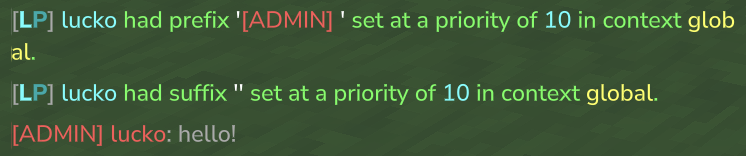 |
Hopefully you get the idea. For more information:
- mini-chat-formatter (GitHub)
- Prefixes, Suffixes & Meta (LP wiki)
- MiniMessage format (PaperMC docs)
Advanced chat formatting options
For more advanced chat formatting, we recommend using a dedicated chat plugin that integrates with LuckPerms. Some options include: HeroChat, EliteEssentials, EssentialsPlus, and others.
Integrating with the LuckPerms API
We have created a basic example plugin which demonstrates how to access the LuckPerms API from a Hytale plugin.
https://github.com/LuckPerms/api-cookbook-hytale
The key things are:
1) Declare LuckPerms as a dependency or optional dependency
In your plugin manifest.json, you must include either:
{
  "Dependencies": {
    "LuckPerms:LuckPerms": "*"
  }
}
or
{
  "OptionalDependencies": {
    "LuckPerms:LuckPerms": "*"
  }
}
This is because Hytale's plugin manager isolates classloaders between plugins, except if a dependency is declared.
2) Obtain the API instance from JavaPlugin.start() or later
LuckPerms performs it's final initialisation during the "start" phase, it is not ready during the "setup" phase.
  @Override
  protected void setup() {
    // doesn't work! ❌
    LuckPerms luckPerms = LuckPermsProvider.get();
  }

  @Override
  protected void start() {
    // works! ✅
    LuckPerms luckPerms = LuckPermsProvider.get();
  }
3) PlayerAdapter and ContextManager expect PlayerRef
Methods in the LuckPerms API that expect a "player" object need to be passed a PlayerRef, not a Player.
For example:
// PlayerAdapter is a convenience class for converting
// between Hytale's PlayerRef and LuckPerms' User objects
PlayerAdapter<PlayerRef> playerAdapter = LuckPermsProvider.get().getPlayerAdapter(PlayerRef.class);

User user = playerAdapter.getUser(playerRef);
CachedPermissionData permissionData = playerAdapter.getPermissionData(playerRef);
CachedMetaData metaData = playerAdapter.getMetaData(playerRef);

// Get the players prefix, for example :)
String prefix = metaData.getPrefix();
Other
Please come and chat with us in Discord for help. There is a dedicated channel for Hytale questions :)